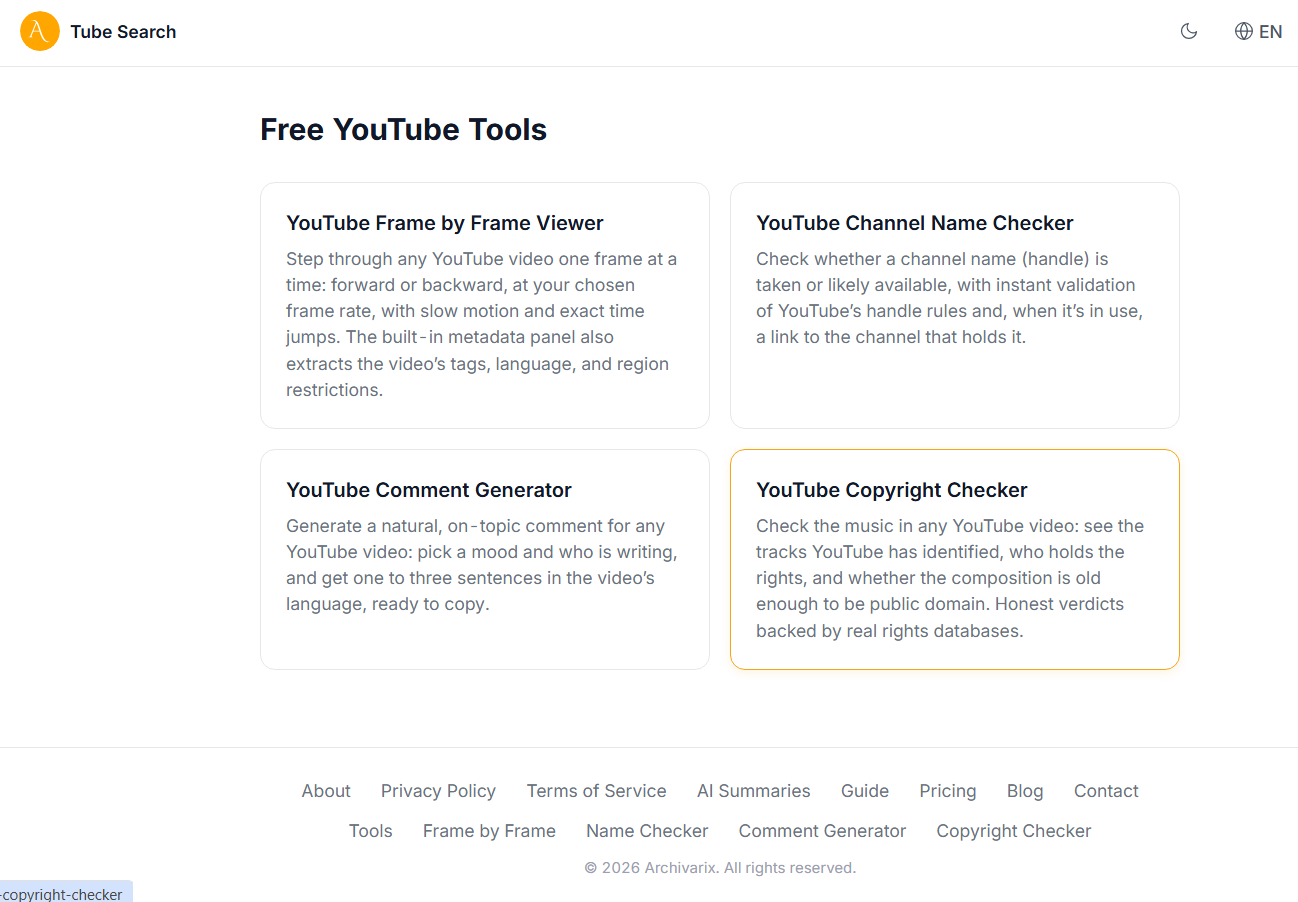
Free YouTube Tools on Tube Search: Frame by Frame Viewer, Tags, Name Checker and Copyright Checker
Tube Search now has a section of free YouTube tools. These are small utilities that solve specific everyday tasks: stepping through a video frame by frame, extracting hidden tags, checking whether a channel name is taken, writing a comment, or figuring out the copyright status of the music in a video. Everything runs right in the browser, no installation and no signup. Here is what each tool does and who it is for.
Frame by Frame Viewer
YouTube Frame by Frame Viewer lets you walk through any video one frame at a time, forward and backward. Paste a video link, pick the frame rate (most modern uploads are 30 or 60 fps), and the "Previous frame" and "Next frame" buttons move the video by exactly one frame. The counters show the current time down to the millisecond and the frame number. There is slow motion starting at 0.25x, jumping to an exact time or frame number, and you can copy a link to a specific frame: whoever opens it sees the video at the same position and speed.
This is handy wherever a precise moment matters: breaking down sports technique, analyzing edits, hunting for easter eggs, verifying footage in research and OSINT work. YouTube's own player can also step through frames with the period and comma keys, but without an fps selector, exact jumps, or frame-precise links.
Below the player, the tool has a second useful part: a metadata panel. It shows the video's tags, the keywords the uploader entered when publishing. YouTube stores them but never displays them to viewers. The whole list copies with one click, which is convenient for analyzing other channels' videos and picking tags for your own. The same panel shows region restrictions (which countries the video is blocked in), the metadata and audio language, and the archive status: whether the video exists in the Tube Search index, which covers over a billion videos, including deleted ones.
Channel Name Checker
YouTube Channel Name Checker answers a simple question: is this channel name (handle) taken. Type a name with or without the @, and the tool first validates it against YouTube's rules as you type (3 to 30 characters, allowed symbols, no dots at the start or end), then queries YouTube's official API. If the handle is taken, you will see which channel uses it, its subscriber count, and a link to it. If it is free, the tool honestly says "likely available": YouTube does not publish a list of reserved names, so nobody can give a hundred percent guarantee, but the absence of an active channel with that handle is checked precisely.
Useful before launching a new channel or rebranding: you can quickly run through options and see who holds similar names before changing anything in YouTube Studio. Handles are first come, first served, so a good free name is worth claiming right away.
Comment Generator
YouTube Comment Generator writes a short comment for a specific video. Paste a link, pick a mood (positive, neutral, or negative) and who is writing, male or female. The latter is not a whim: in many languages verb forms depend on the author's gender, and a mismatch instantly reads as fake. The tool reads the video's metadata through the official API and generates one to three natural sentences in the language of the video itself: a Russian video gets a Russian comment, a Spanish one gets Spanish.
The comment is written by an AI model running on our own servers and is created fresh for each specific video, these are not templates. Nothing is posted automatically: the tool only writes the text, and whether to copy and post it is up to you. The sensible way to use it: take the generated version as a draft, tweak a couple of words to match your real impression, and leave a meaningful comment instead of a generic "nice". Spamming the same text under dozens of videos is a bad idea, YouTube cleans that up.
Music Copyright Checker
YouTube Copyright Checker shows which music plays in a video and what the status of its rights is. The tool reads the machine-readable "Music in this video" credits that YouTube attaches when a rights holder has claimed a track through Content ID, then checks each track against real databases: Deezer provides the ISRC recording code, label and release date, MusicBrainz links the recording to the composition and its authors, and iTunes shows the phonogram owner. No guessing from the video title, which is what most "copyright checkers" do.
For each track you get a verdict: rights-managed music, a major label release, public domain, or a royalty-free library track. The status of the composition (the song itself) and the recording (the specific performance) is shown separately, for the US and for the EU, because their protection terms are calculated differently. This matters most for classical music: a Bach piece has long been in the public domain, but a 2015 orchestral recording of it will stay protected into the 2080s. If a video carries no music credits, the tool honestly says "inconclusive" rather than inventing an answer. And one important caveat: "could not identify" never means "free to use".
The tool is useful for creators choosing music for their videos who do not want a Content ID claim or a strike, and for anyone trying to sort out the status of a specific track. If the music turns out to be rights-managed, the links under the result point to sources you can actually use: the YouTube Audio Library, Musopen, and the Free Music Archive. It is a research tool, not legal advice: for commercial projects, rights questions should still go through a specialist.
What it costs
All four tools are free and require no account. Operations that call external APIs or involve the AI model have daily limits for anonymous visitors, to keep the service fast for everyone. A free Tube Search account raises those limits substantially. The frame by frame player itself has no limits at all.
More tools are on the way: tube.archivarix.net/tools.
The use of article materials is allowed only if the link to the source is posted: https://archivarix.com/en/blog/youtube-tools/

Hi everyone,
To celebrate our anniversary, we’re bringing back our best offer of the year: up to 100% bonus credit when you add funds. We only offer a bonus this big on our anniversary — once a year.…
Tube Search now has a section of free YouTube tools. These are small utilities that solve specific everyday tasks: stepping through a video frame by frame, extracting hidden tags, checking whether a c…
You found the video you needed on YouTube, but you do not want to watch the whole thing just for a couple of lines. Or you need the text of a lecture to translate it, quote it, or simply skim through …
Open any article from a decade ago and click through the links in it. There is a good chance that some of them lead nowhere. Instead of the page you wanted, you get a 404 error, a parked domain advert…
The web keeps falling apart. Pages go offline, accounts get deleted, papers slip behind paywalls, projects shut down. Usually a copy survives somewhere, in the Wayback Machine, archive.today, Common C…
When you find a deleted YouTube video through Tube Search, you typically get metadata: a title, description, upload date, and sometimes subtitles. That is already useful. But reading through raw subti…
Tube Search is a search engine for archived YouTube data. The service aggregates information from multiple public sources: the Wayback Machine (Internet Archive), Common Crawl, and various collected Y…
Over time, external links in WordPress posts inevitably break, pages get deleted, domains expire, videos become unavailable. Checking hundreds or thousands of links manually is impractical. Archivarix…
One trillion saved pages. Over 99 petabytes of data. Hundreds of crawls running simultaneously every day. Behind these numbers lies a question that everyone who professionally works with web archives …
Buying an expired domain with history is one of the most effective ways to launch a new project with an already existing backlink profile, trust, and even traffic. Instead of promoting a bare domain f…