Archivarix External Images Importer 2.0 - New Plugin Version for WordPress
What's New in Version 2.0?
Background Image Processing
The main innovation is true background processing. Now you can close your browser and the plugin will continue importing images on the server. This is especially important when working with large sites that may have thousands of external images.
The plugin uses WP Background Processing architecture, which ensures reliable operation even on servers with script execution time limits.
Detailed Statistics and Logs
The new Statistics tab shows detailed information about the import process:
- New Downloads - successfully downloaded images
- Cached/Existing - images that were already in the media library
- Failed - failed to download
- Removed - removed from posts
- Placeholder - replaced with a placeholder
All events are recorded in log files, which can be viewed directly in the plugin interface or exported to CSV for analysis.
Srcset Support
Version 2.0 fully supports the srcset attribute. The plugin finds and processes all image sizes specified in responsive markup, not just the main src.
Improved Web Archive Integration
The plugin uses the post publication date to search for snapshots in the Wayback Machine. This increases the likelihood of finding images exactly as they were when the content was created.
When the original source is unavailable, the plugin automatically tries several archive search strategies:
- Exact post publication date
- Latest available snapshot
- Gradual search in earlier dates
Duplicate Protection
The new database-level locking system prevents re-downloading the same images during parallel processing. This saves time and bandwidth.
How to Use the Plugin
Step 1: Configuration
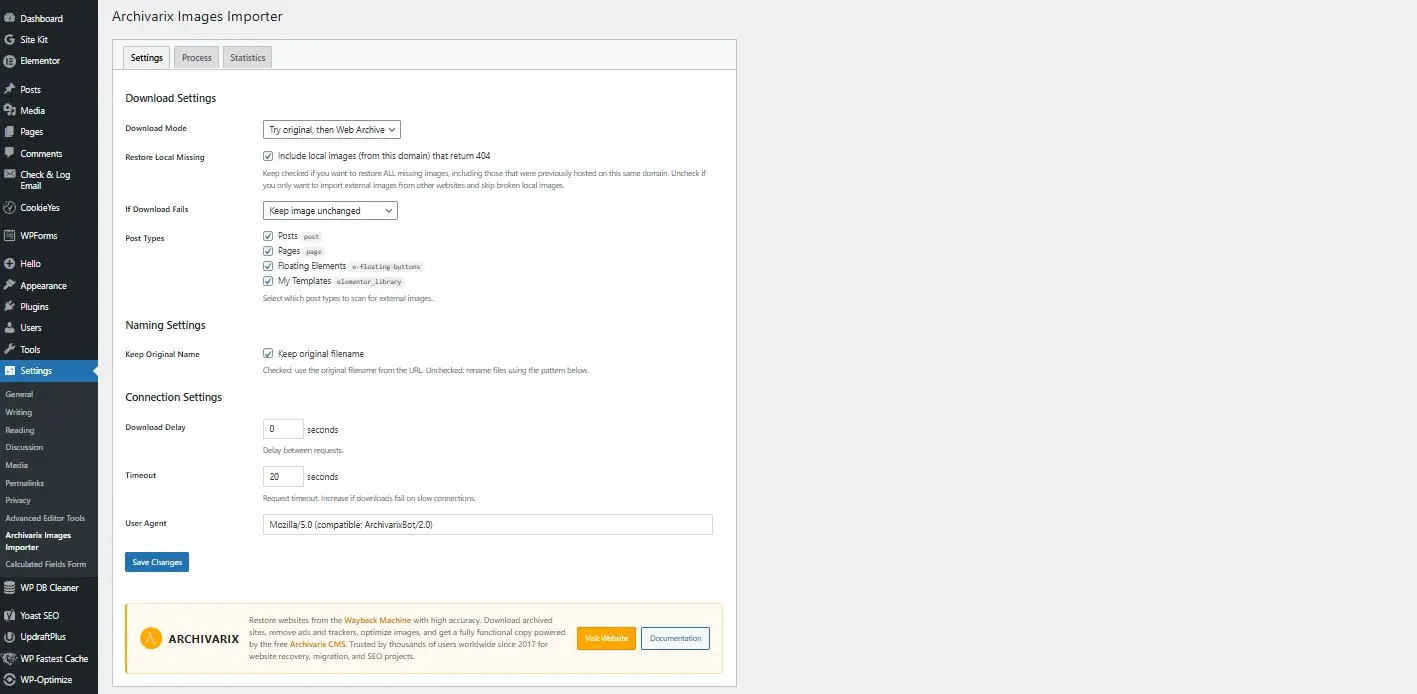
Go to Settings → Archivarix Images Importer and select the download mode:
- Try original, then Web Archive - first tries to download from the original URL, if it fails, searches the archive
- Try Web Archive, then original - first searches the archive (useful for old sites)
- Only original - original sources only
- Only Web Archive - Wayback Machine only
Step 2: Scanning
On the Process tab, click Start Scan. The plugin will analyze all posts and pages, find external images, and show statistics:
- Number of posts
- Found external images
- Local images with 404 error
- Invalid URLs
Step 3: Processing
Click Process to start the import. You will see a progress bar and can close the page - processing will continue in the background.
Integration with Archivarix
The plugin is especially useful when working with the "Extract structured content" feature of our service. When you restore a site from Web Archive and export content in WXR format for WordPress, images remain as external links.
After importing articles through the standard WordPress importer, activate our plugin - it will automatically download all images to the media library and update links in posts.
Requirements
- WordPress 6.0 or higher
- PHP 7.4 or higher
- cURL extension for PHP
Installation
The plugin is available in the official WordPress directory:
Archivarix External Images Importer
Or install directly from WordPress admin: Plugins → Add New → search "Archivarix External Images Importer"
Support
If you have questions or suggestions:
The use of article materials is allowed only if the link to the source is posted: https://archivarix.com/en/blog/external-images-importer/

Tube Search is a search engine for archived YouTube data. The service aggregates information from multiple public sources: the Wayback Machine (Internet Archive), Common Crawl, and various collected Y…
Over time, external links in WordPress posts inevitably break, pages get deleted, domains expire, videos become unavailable. Checking hundreds or thousands of links manually is impractical. Archivarix…
One trillion saved pages. Over 99 petabytes of data. Hundreds of crawls running simultaneously every day. Behind these numbers lies a question that everyone who professionally works with web archives …
Buying an expired domain with history is one of the most effective ways to launch a new project with an already existing backlink profile, trust, and even traffic. Instead of promoting a bare domain f…
When it comes to restoring websites from archives, almost everyone thinks only of the Wayback Machine. That's understandable: archive.org is well known, it has a convenient interface, a trillion saved…
We've released a browser extension called Archivarix Cache Viewer. It's available for Chrome, Edge and Firefox. The extension is free and contains no ads whatsoever.
The idea is simple: quick access …
When you restore a website from the Web Archive, you expect to get original content that was once written by real people. But if the site's archives were made after 2023, there's a real chance of enco…
In October 2025, the Wayback Machine reached the milestone of one trillion archived web pages. Over 100,000 terabytes of data. This is a massive achievement for a nonprofit organization that has been …
We are pleased to introduce version 2.0 of our WordPress plugin for importing external images. This is not just an update, the plugin has been completely rewritten from scratch based on modern requir…
Dear friends!
Black Friday and Cyber Monday are the best time to save on future website restores.
If you plan to restore websites, top up your balance in advance, or simply want to get more – now is…